Silhouette Cutting Mat 24 – Precise Cutting Mat for Cameo Plotters
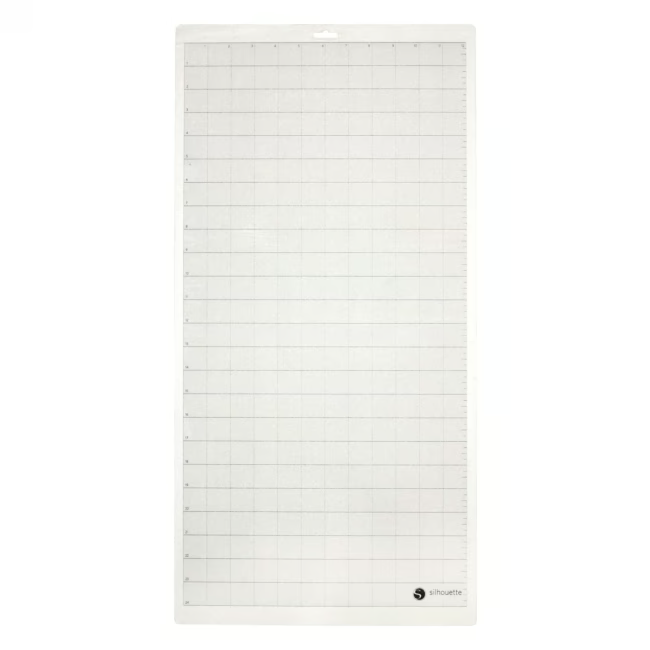
The Silhouette Cutting Mat 24 is a self-adhesive cutting mat measuring 30 x 60 cm with standard adhesion. It is specifically designed for use with Silhouette Cameo cutting plotters and reliably holds paper and thin materials during the cutting process.
Reusable adhesive layer: The mat provides sufficient tack for standard paper and can be easily cleaned after use, allowing multiple uses.
Broad compatibility: Fits Silhouette Cameo 1–5, Cameo 4 Plus, Cameo 4 Pro, and Cameo Pro MK‑II – ideal for various plotter generations.
Large work area: With 30 x 60 cm, the cutting mat offers ample space for medium-sized craft projects, from cards to stickers.
Standard adhesion: The tack is specifically calibrated for common paper weights – strong enough for precise cuts but removable without residue.
What sets the Silhouette Cutting Mat 24 apart
Unlike universal mats, this cutting mat is precisely matched to the roller mechanism of the Silhouette Cameo series. The adhesive layer is evenly applied, ensuring clean paper feed. With standard adhesion, it is particularly suitable for everyday paper crafting without holding the material too firmly or too loosely.
Ideal for...
Hobbyists, scrapbooking enthusiasts, and home plotters who work with Silhouette Cameo devices and need a reliable, reusable cutting mat for paper projects. The mat is also suitable for use in schools and workshops where plotters are used regularly.
How to use the Silhouette Cutting Mat 24
Place the cutting mat on a clean, flat surface and remove the protective film. Position your material (paper, cardstock) on the adhesive surface and smooth it out. Insert the mat into the plotter and start the cutting process. After use, carefully peel off the material. To clean the adhesive layer, use a sticker remover or wash the mat with lukewarm water and mild soap – after drying, it is ready for reuse.
Silhouette is a US-based manufacturer of cutting plotters and accessories for craft and creative applications. The brand is known for its precision plotters like the Cameo series and a wide range of consumables. Silhouette products are valued worldwide by hobbyists and professional users.
A cutting mat is a self-adhesive mat that holds the material to be cut (e.g., paper) in place during the cutting process in a plotter. It ensures precise cuts and prevents slipping.
The mat is compatible with Silhouette Cameo 1, 2, 3, 4, 5, Cameo 4 Plus, Cameo 4 Pro, Cameo 5 Plus, and Cameo Pro MK-II.
The cutting mat has standard adhesion, specifically designed for common paper and thin materials. It provides sufficient tack for precise cuts but can be removed without residue.
First remove coarse residue with a sticker remover. For a thorough clean, wash the mat with lukewarm water and mild soap. Let it dry completely before reuse.
The adhesive layer lasts for many uses under normal conditions. When adhesion decreases, the mat can be cleaned. In case of heavy soiling or wear, replacement is recommended.
Subscribe to the newsletter
New arrivals, promotions and exclusive offers — straight to your inbox.




Please complete your information below to login.
Sign In
Create New Account