Peach LabelPrinter PE110 – Direct Thermal Printing for Clear Labels
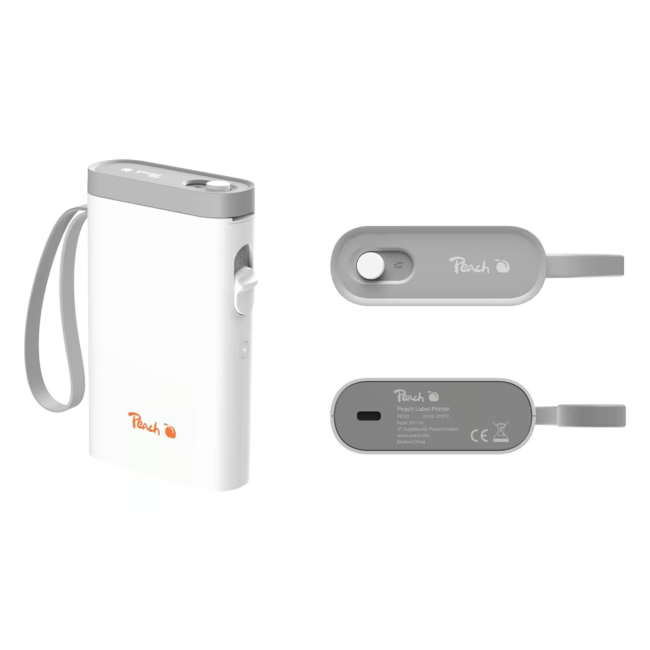
The Peach LabelPrinter PE110 is a compact direct thermal label printer. It prints without ink or toner and is powered via USB-C, making it ideal for home or office use.
Direct thermal printing saves consumables – prints quickly and reliably on thermal labels.
Space-saving design – the small printer fits on any desk and is easy to carry around.
Simple USB-C connection – one cable for power and data, no separate power supply needed.
Versatile use – for address labels, price marking, file folders, cable marking, and more.
No waiting time – direct thermal printing delivers instantly dry, smudge-free labels.
What sets the LabelPrinter PE110 apart
Unlike inkjet or laser printers, the PE110 does not require expensive consumables like toner or ink. The direct thermal technology is low-maintenance and particularly environmentally friendly, as only the label material is consumed.
Ideal for...
Home users who want to bring order to their household or office, as well as small businesses that need quick and cost-effective labeling. Also suitable for occasional home use to label storage containers, gifts, or cables.
How to use the LabelPrinter PE110
Connect the printer via USB-C to your computer. Install the drivers if necessary and choose a label template in your labeling software. Insert a thermal label and start printing. The label can be used immediately after printing.
Peach is a brand specializing in printing accessories and label printers. Their products are known for ease of use and reliability. Peach offers solutions for private and commercial use, enabling efficient labeling and organization.
The Peach LabelPrinter PE110 is a compact direct thermal label printer. It prints without ink or toner and is powered via USB-C.
The printer works with standard thermal labels in various sizes. Specific labels from Peach or other compatible manufacturers are suitable.
No, the PE110 uses the direct thermal process. The color is activated by heat on the label material, without ink or toner.
The printer is powered via the USB-C cable. No separate power supply is required. Power is supplied directly through the computer's USB port.
The printer is compact and lightweight but requires a wired connection to a computer. It is not equipped with a battery, so mobile use without a power source is not possible.
Subscribe to the newsletter
New arrivals, promotions and exclusive offers — straight to your inbox.




Please complete your information below to login.
Sign In
Create New Account