Panasonic Toughpad Docking Station FZ-VEBG11AU – Versatile Connectivity for Your Toughpad
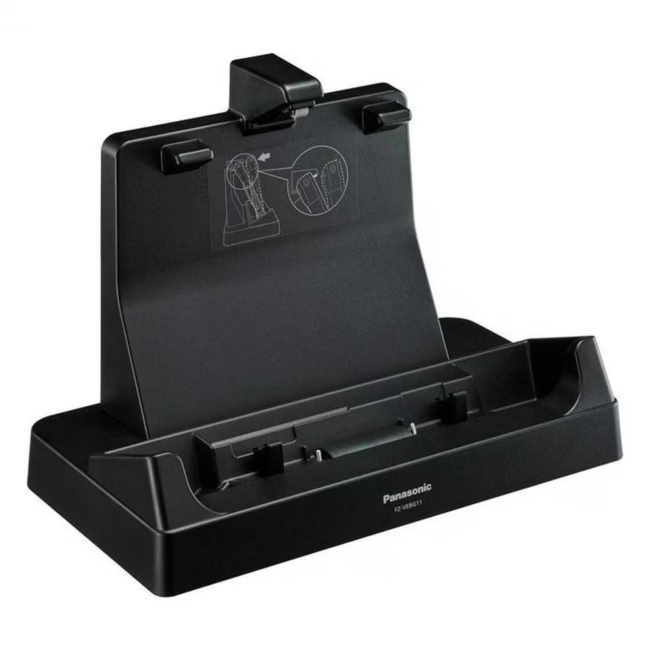
The Panasonic Toughpad Docking Station FZ-VEBG11AU is the ideal extension for your Toughpad FZ-G1 or FZ-G2. It transforms your tablet into a full-fledged workstation, providing all essential interfaces for office or field use. The docking station not only charges the device but also allows connection of monitors, network, serial devices, and USB peripherals.
Compatible with Toughpad FZ-G1 and FZ-G2 – perfect fit and secure connection
Versatile interfaces: HDMI, VGA, RJ-45 (LAN), USB 3.0, and serial port – for monitor, network, and peripherals
Integrated charging function – charges the Toughpad during use
Rugged construction – ideal for demanding use in industry, logistics, or outdoor environments
Easy handling – tablet slides in effortlessly and is ready for use immediately
What sets the Panasonic Toughpad Docking Station apart
The FZ-VEBG11AU is specifically designed for the Toughpad FZ-G1 and FZ-G2 models, guaranteeing optimal mechanical and electrical connectivity. Unlike generic USB hubs, it provides dedicated connectors for VGA and serial devices, which are still standard in many industrial environments. The robust construction ensures longevity even with frequent docking and undocking.
Ideal for...
This docking station is aimed at professional users in logistics, field service, industry, and public administration who use their Toughpad as their primary work device. It is the perfect solution for workstations where mobility is key but all connections of a desktop PC are also required. It is also excellent for presentations or use as a media player.
How to use the Toughpad Docking Station
Simply insert the Toughpad from above into the docking station – it clicks securely into place. Connect desired peripherals to the rear ports: monitor via HDMI or VGA, network via LAN, as well as USB devices or serial instruments. The tablet charges automatically. To remove, press the eject button and lift the tablet off. No driver installation is required – the docking station is immediately recognized by the operating system.
Panasonic is a Japanese electronics corporation headquartered in Kadoma. The company is known for its broad product range from consumer electronics to professional solutions. The Toughbook and Toughpad series represent robust, reliable computing solutions for mobile use in demanding environments.




Please complete your information below to login.
Sign In
Create New Account