CHF 5 off the first order
Subscribe to the newsletter and secure the discount.
Free shipping from CHF 75 (parcel delivery)
Monitor for Home Office in Switzerland: What to Check
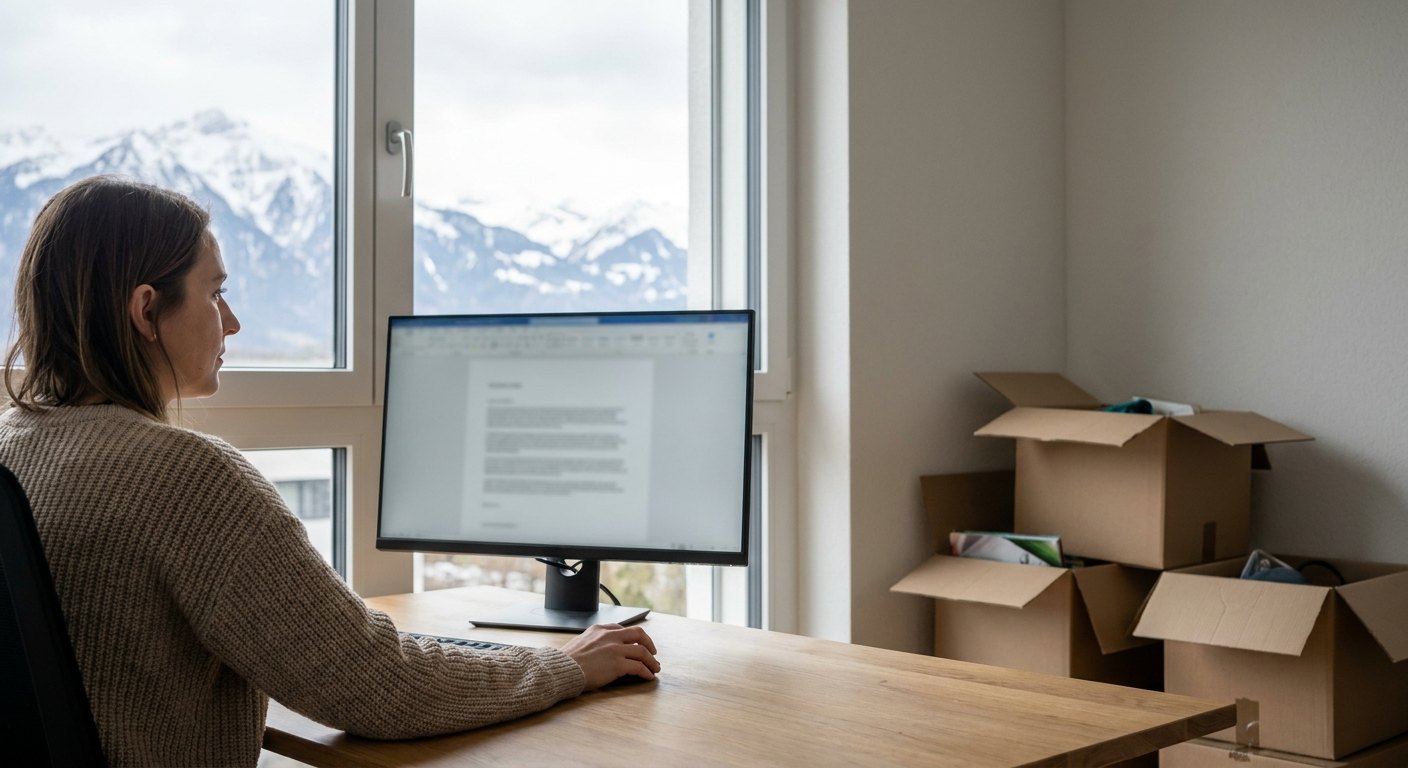
A studio apartment near Zürich Hauptbahnhof, a folding desk left behind by the previous tenant, and a work laptop still set to a different time zone. This is where many international employees start their first Swiss home office. The desk is rented. The chair is borrowed. The monitor is different: it is a purchase worth planning properly, since it will sit in the same spot for eight or nine hours a day, five days a week, roughly 45 hours in front of the same panel.
Home offices in Switzerland come with quirks that rarely show up in a furniture catalogue. Older buildings in Basel or Bern often have a single power socket per room, and it rarely sits near the window where the light is best. Radiators, too, are frequently mounted exactly where a second desk would go, forcing awkward compromises on cable length and screen placement. These details matter more than they seem, because a monitor bought without measuring the room first can end up unusable within weeks.
Screen Size and Viewing Distance
A 27-inch screen is the most practical choice for a typical Swiss apartment desk, which averages around 120 cm in width. The panel itself takes up about 60 cm of that, which leaves space for a keyboard in front of it. Anything larger than 32 inches, roughly 71 cm across, tends to overwhelm rooms under 20 square metres, and scanning a screen that wide for nine hours a day causes more neck strain than it solves.
The distance between the eyes and the screen should sit between 60 cm and 80 cm, closer than many people expect. That distance matters. Sitting further away only pushes the text smaller, which then gets compensated with a larger font size, cancelling out the benefit of the extra screen space in the first place.
Matching products


Resolution, Refresh Rate and Brightness
Resolution decides how much text fits on the screen without squinting, which matters directly for anyone reading contracts and spreadsheets most of the day. A 4K panel, 3840 by 2160 pixels, delivers noticeably sharper text than a standard Full HD screen: around 163 pixels per inch on a 27-inch diagonal, against 82 pixels per inch at Full HD on the same size. It also demands more from the graphics card of an older laptop.
For office work, a refresh rate of 75 Hz already feels like a comfortable upgrade over the standard 60 Hz, a new image every 13 milliseconds instead of every 17. Panels running at 144 Hz or more are built for gaming and add little value for spreadsheets and video calls.
Brightness should reach at least 350 cd/m² for rooms with south-facing windows, against the 250 cd/m² common on entry-level office panels, since Swiss winters bring low sun angles that hit the screen directly between November and February. A matte, anti-glare coating helps more in that season than any brightness setting can, especially in flats above the fourth floor where curtains are often the only shading option.
A quick check before buying: hold a hand flat against the screen surface at the intended desk spot, at the time of day work usually happens. If reflections are already visible with the screen off, brightness and coating both need to be higher than the entry-level spec sheet suggests.
Reducing Eye Strain During Long Screen Days
Flicker-free backlighting and a blue-light filter matter more for anyone working nine-hour days than most spec sheets suggest. The eyes register that flicker below conscious awareness, and it still adds up to fatigue by the evening. A panel refresh rate of at least 75 Hz combined with a flicker-free certification reduces the kind of low-grade headache that often gets blamed on screen time in general, when the actual cause is a specific panel technology.
Swiss apartments with radiator heating also tend to run drier air than expected, around 30% relative humidity in winter, against the 40 to 50% usually considered comfortable. That dries out the eyes faster and makes any existing screen flicker more noticeable by mid-afternoon.
Ergonomics and Placement in the Room
The top edge of the screen should sit at or just below eye level, tilted back by 10 to 20 degrees, which often means placing the laptop on a stand and working from an external screen instead. A laptop lid resting on the desk sits around 20 cm below that line.
Many landlords in Switzerland do not allow drilling into walls, so a monitor arm that clamps to the desk edge is usually the safer option over a wall-mounted bracket. Anyone shopping for a screen that will stay in daily use should look at the range of monitors with height-adjustable stands built in, since retrofitting a separate arm later adds unnecessary cost and clutter.
- Desk depth of at least 60 cm, so the screen is not pushed against the wall
- A stand that adjusts height without tools, since flats change occupants and desks change size
- Cable length long enough to reach the only socket in the room, often behind the desk
- A tilt range that compensates for a desk lower than 72 cm, common in older flats
Completing the Desk Setup
A monitor rarely works alone. Docking through a single USB-C cable keeps the desk free of the clutter that is common in older Swiss apartments, where two sockets per wall is often the limit. One port that carries the picture and up to 65 W of charging power replaces two separate plugs.
Pairing the screen with a mechanical keyboard reduces wrist strain during long typing sessions, and a layout that matches the hand rather than a generic office model makes a bigger difference than most people expect after a few months of daily use. The same logic applies to the mouse, which gets clicked several thousand times a day and deserves more thought than the default model bundled with a laptop.
Connectivity and Working Across Time Zones
Many new arrivals continue working for an employer based outside Switzerland, which often means video calls starting at 7am or running past 9pm to match a different time zone. A six-hour offset to the American east coast turns the last call of the day into an evening appointment. A monitor with a built-in webcam and speakers removes one more item from an already crowded desk.
A screen with at least two HDMI inputs plus one USB-C port allows switching between a work laptop and a personal computer without unplugging cables every time. Fewer cables, less friction. For anyone splitting time between a work laptop and a private setup, that single detail saves more frustration over a year than any resolution upgrade.
One thing worth avoiding: curved monitors above 32 inches for a single-person desk setup. They look impressive in photos, but the curvature distorts spreadsheet columns and browser windows at the edges, and most Swiss desks, often only 60 to 70 cm deep, are not deep enough to sit at the correct distance from a screen that size anyway. A flat 27-inch or 32-inch panel with a solid stand covers almost every home-office need without that compromise.
Frequently asked questions
What monitor size works best for a small Swiss apartment desk?
A 27-inch screen fits most desks under 130 cm wide and keeps viewing distance comfortable at 60 to 80 cm. Anything above 32 inches usually needs more desk depth than a typical rented flat offers.
Is 4K resolution necessary for office work?
Not strictly, but it makes small text noticeably sharper on a 27-inch or 32-inch screen, which reduces eye strain during long working days. Full HD remains acceptable on screens up to 24 inches.
How should a monitor be positioned in an older Swiss flat with limited sockets?
Placing the desk near the existing socket first and adjusting the monitor arm afterwards usually works better than choosing the ideal light position and running an extension cable across the room.
Do curved monitors make sense for a single-person home office?
Rarely above 32 inches, since the curvature distorts straight lines in spreadsheets and most desks are not deep enough for the correct viewing distance at that size.

Advice and buying guides from the editorial team for the home, the kitchen and technology. Written with an eye on what actually makes a difference in everyday Swiss life.
To the shopPopular Posts

In focus
 Kitchen
Choosing a Kitchen Knife in Switzerland: What Stays Sharp
Kitchen
Choosing a Kitchen Knife in Switzerland: What Stays Sharp
Please complete your information below to login.
Sign In
Create New Account