HP OfficeJet Pro 9730e A3 color multifunction printer with 500-sheet capacity, mobile printing, and 22 PPM black-and-white speed for professional office use.
HP OfficeJet Pro 9730e – A3 Color All-in-One Multifunction Printer
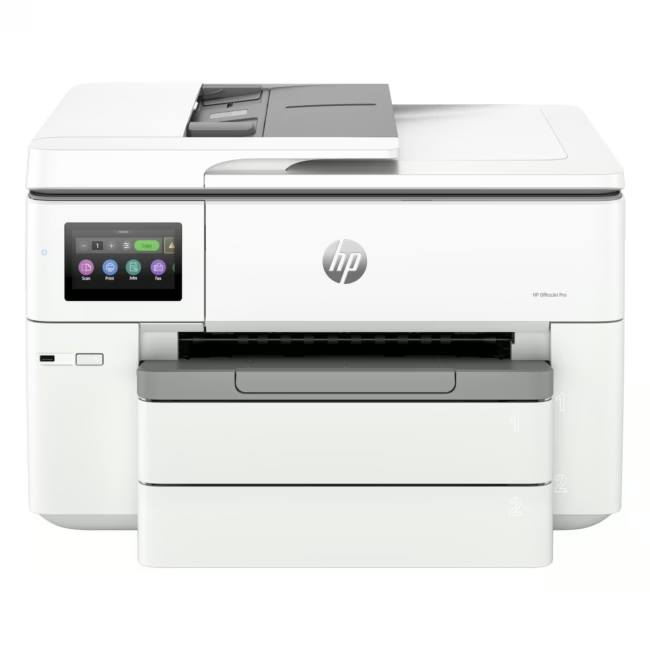
The HP OfficeJet Pro 9730e is a color all-in-one multifunction printer designed for professional environments that require A3-size printing, scanning, and copying in a single device. With mobile printing support and dual paper feeders, it handles high-volume office workflows efficiently.
A3 print format enables large-format documents, spreadsheets, and posters from a single desktop device
Color printing at 18 PPM and black-and-white at 22 PPM delivers fast output for mixed workloads
500-sheet total paper capacity across two feeders reduces frequent refills during busy workdays
Mobile printing capability allows direct output from smartphones and tablets without a desktop computer
Das zeichnet HP OfficeJet Pro 9730e aus
The 9730e combines A3 handling with color multifunction capability in a compact office footprint. Unlike standard A4-only office printers, it accommodates larger formats without sacrificing speed — color at 18 PPM and monochrome at 22 PPM — making it suitable for teams that regularly produce presentations, marketing materials, or oversized documents.
Ideal for...
Small to medium offices and creative teams that need A3 color output alongside standard document printing. The dual paper feeder setup and 500-sheet capacity suit environments where print jobs vary in size and frequency, from daily internal reports to occasional large-format prints.
Anwendung von HP OfficeJet Pro 9730e
Connect via USB 2.0 or LAN for a wired office setup, or use WLAN for flexible placement within the workspace. Mobile printing enables direct output from compatible devices. The A3 feed path handles heavier media such as cardstock and labels alongside standard office paper.
HP Inc. is a global technology company headquartered in Palo Alto, California, manufacturing printers, PCs, and related peripherals. The OfficeJet Pro line targets small to medium business users with A3-capable multifunction devices that combine printing, scanning, and copying in a single unit.
The HP OfficeJet Pro 9730e is a color all-in-one multifunction printer (MFP) designed for professional office use. It prints, scans, and copies in A3 size, making it suitable for documents, presentations, and marketing materials that require larger format output than standard A4 printers provide.
The HP OfficeJet Pro 9730e offers USB 2.0 and LAN (Ethernet) for wired connectivity, plus WLAN (Wi-Fi) for wireless printing. Mobile printing is supported, enabling direct output from smartphones and tablets without requiring a desktop computer.
Color printing speed is 18 pages per minute (PPM); black-and-white printing speed is 22 PPM. The total paper capacity is 500 sheets, distributed across two paper feeders, which reduces the need for frequent refills during high-volume print runs.
The delivery includes the HP OfficeJet Pro 9730e printer unit, power cable, USB 2.0 cable, installation guide, and starter toner cartridges. Exact consumables included may vary by region — refer to the packaging specifications for details.
The HP OfficeJet Pro 9730e comes with a 24-month manufacturer warranty that covers defects in materials and workmanship under normal office use. Warranty registration and claim processing are handled through HP Inc. customer service directly.
Subscribe to the newsletter
New arrivals, promotions and exclusive offers — straight to your inbox.




Please complete your information below to login.
Sign In
Create New Account