HP internal DVD-RW drive – Upgrade your PC with an optical drive
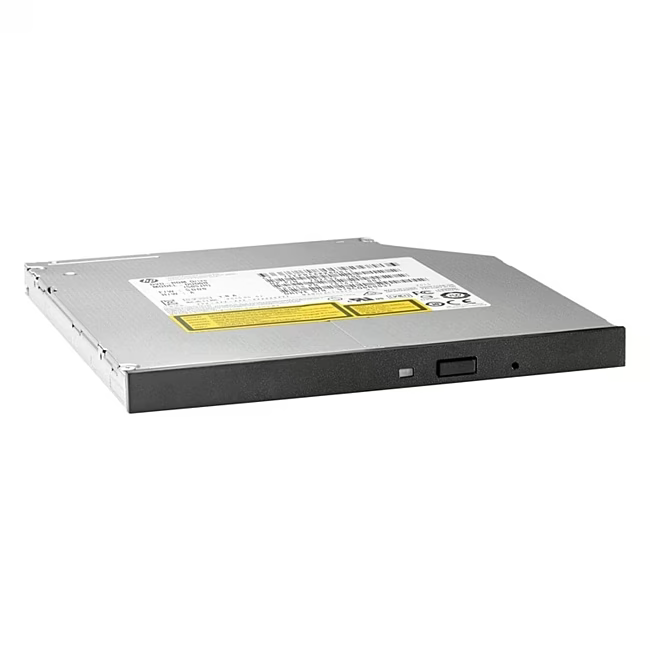
With the HP internal DVD-RW drive, you can add an optical drive to your desktop computer. It reads CDs and DVDs and writes common media – ideal for installing older software, creating backup copies, or playing your media collection. Thanks to the SATA interface, it can be easily installed in standard PC cases.
SATA interface for smooth integration into modern motherboards – Plug & Play without additional drivers
Tray mechanism for convenient insertion and removal of media, supports CDs and DVDs
Supports common formats: CD-R, CD-RW, DVD-R, DVD-RW, DVD+R, DVD+R DL and DVD+RW – versatile
Silver metal housing blends visually into most PC cases and fits any free 5.25-inch bay
24 months manufacturer warranty provide long-term peace of mind during use
What sets the HP DVD-RW drive apart
Unlike many generic drives, this model impresses with proven HP quality and precise workmanship. The tray operates quietly and reliably, the burning performance is more than sufficient for home and office use. Supplied without an ODD latch, it is particularly suitable for systems that do not require this specific holder – saving weight and simplifying installation.
Ideal for...
The drive is aimed at home users who want to equip their PC with an optical drive, whether for burning audio CDs, installing programs from disc, or archiving data on DVD. It is also a good choice in office environments that occasionally rely on CD/DVD media.
How to use the HP DVD-RW drive
Turn off the PC and open the case. Slide the drive into a free 5.25-inch drive bay and secure it with screws (not included). Connect the SATA cable to the motherboard and a power cable to the power supply. After booting, the operating system automatically detects the drive – you can immediately insert and use media.
HP Inc. is a leading manufacturer of computers, printers and accessories headquartered in Palo Alto, California. Their products are known for reliability and good compatibility. HP optical drives also offer solid build quality and long-standing experience in PC technology.
It is an optical drive for installation in a desktop PC. It reads and writes CDs and DVDs and connects via SATA.
It requires a free 5.25-inch drive bay and a SATA connector on the motherboard. It is supplied without an ODD latch, so it is suitable for cases without this specific holder.




Please complete your information below to login.
Sign In
Create New Account