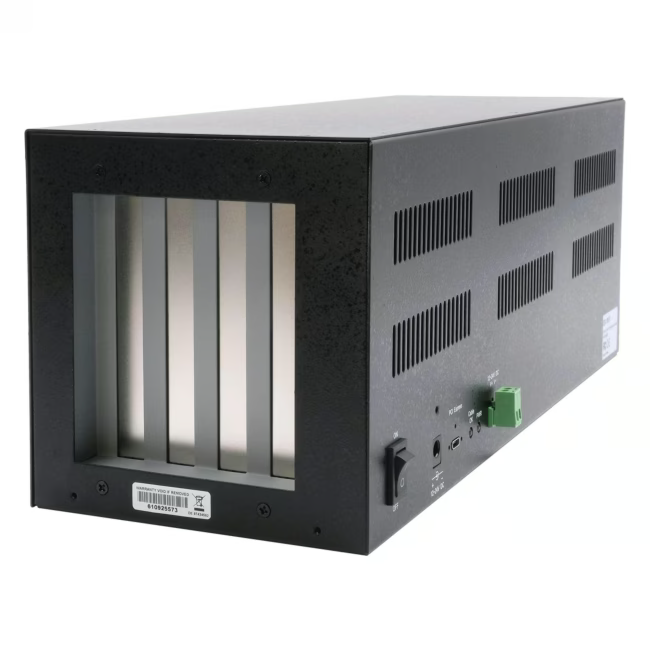
The Exsys EX-1017 is an external expansion box providing four PCIe x1 slots and connects to the computer via an included PCIe x2 host card. It allows the operation of PCIe cards up to 34 cm in length outside the PC case – ideal when space inside the case is limited or cards require specific cooling.
Four PCIe x1 slots allow simultaneous operation of multiple expansion cards such as capture cards, controllers or RAID adapters.
The included PCIe x2 host card connects the box to the PC via a flat cable – signal integrity is maintained.
Long cards up to 34 cm fit inside – the sturdy metal housing protects them and improves heat dissipation.
Plug & Play on Windows and Linux – no additional drivers required for the box itself.
Compact design (approx. 2.5 kg) allows flexible placement next to or under the desk.
What sets the Exsys EX-1017 apart
Unlike simple riser cables, the EX-1017 offers a professional enclosure solution with structured airflow and EMI shielding. The host card uses a PCIe x2 interface and is backward compatible with x4, x8, and x16 slots – maximum flexibility when choosing the installation slot in the PC.
Ideal for...
The expansion box targets system integrators, IT administrators, and performance-oriented users who regularly need to integrate additional PCIe cards into their systems – whether for video surveillance, audio production, data acquisition, or running legacy controller cards in modern PCs without free slots.
How to install the Exsys EX-1017
Turn off the PC and install the PCIe x2 host card into a free PCIe slot on the motherboard.
Connect the host card to the expansion box using the provided cable.
Insert the desired PCIe cards (x1, x4, x8, or x16 – usable in x1 format) into the box slots.
Screw the cards in and connect power (if the box has a separate power connector).
Start the PC – the cards are recognized as if directly plugged into the motherboard.
Exsys, based in Switzerland, has been developing and distributing reliable PC interface cards and expansion solutions for over 30 years. Its products are aimed at industry, business, and professional users who depend on stable communication between computer and peripherals.
The EX-1017 is an external enclosure with four PCIe x1 slots, connected to the PC via an included PCIe x2 host card. It allows the use of additional PCIe cards outside the computer case.
PCIe cards in x1 format as well as x4, x8, or x16 cards that can operate in x1 mode are compatible. The maximum card length is 34 cm.
The box comes with a PCIe x2 host card. It fits into a PCIe x2, x4, x8, or x16 slot on the motherboard.
Install the host card in the PC, connect the cable, insert the PCIe cards into the expansion box, and start the computer. The cards are recognized automatically (Plug & Play).
Exsys provides 24 months warranty on the EX-1017 expansion box and the included host card.
Subscribe to the newsletter
New arrivals, promotions and exclusive offers — straight to your inbox.



Please complete your information below to login.
Sign In
Create New Account