Delock eSATA2 Bracket – External eSATA Ports for Your PC
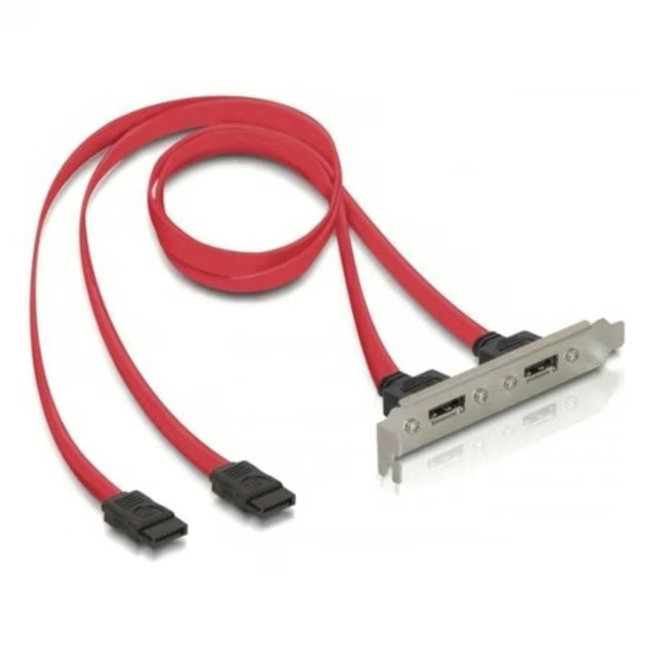
The Delock eSATA2 Bracket is a slot plate that routes two internal SATA2 connectors to two external eSATA2 ports. It allows you to equip your computer with fast external interfaces for connecting eSATA devices.
Two external eSATA2 ports for connecting external hard drives, SSDs, and other eSATA devices – data transfer up to 3 Gbit/s
Easy installation in a free PC case slot, screws included
Compatible with standard SATA2 connectors on the motherboard – no additional driver required
Robust metal housing protects the connectors and ensures durable connections
Unlike USB adapters, eSATA uses the native SATA interface of the motherboard, offering a direct and lossless connection for external drives. The Delock bracket impresses with high-quality workmanship and thoughtful design – ideal for users who demand maximum performance and reliability.
Ideal for...
PC enthusiasts and IT administrators looking to upgrade older computers with external eSATA ports. Also suitable for users who regularly back up large amounts of data to external drives and rely on the stable SATA connection.
How to use the eSATA2 Bracket
Turn off the PC and open the case. Insert the bracket into a free slot and secure it with the included screws. Connect the bracket's internal SATA2 connectors via SATA cables to free ports on the motherboard. After closing the case, you can connect external eSATA devices to the new ports.
Delock is a German manufacturer of cables, adapters, and computer accessories. The company offers innovative solutions for connectivity and data transfer. Delock products are known for their high-quality workmanship and compatibility with common standards.
An eSATA2 Bracket is a slot plate that converts internal SATA2 connectors to external eSATA2 ports. It allows connecting eSATA devices to a PC without requiring additional expansion cards.
It is used to add two external eSATA2 ports to a PC. Ideal for connecting external hard drives, SSDs, or other eSATA devices with high data transfer rates.
The bracket is compatible with standard SATA2 connectors on the motherboard. It provides two internal SATA2 connectors and two external eSATA2 ports. A SATA cable is required for the connection.
Turn off and open the PC. Insert the bracket into a free slot and secure it with screws. Then connect the internal SATA2 connectors via SATA cables to the motherboard.
Delock offers a 24-month manufacturer warranty from the date of purchase, covering material and manufacturing defects.
Subscribe to the newsletter
New arrivals, promotions and exclusive offers — straight to your inbox.




Please complete your information below to login.
Sign In
Create New Account