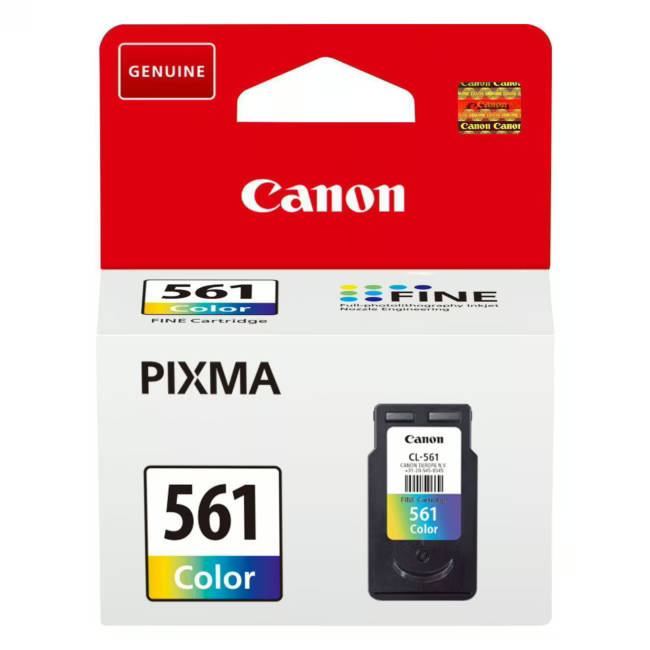
The Canon CL-561 (3731C001) is a tri-color ink cartridge delivering cyan, magenta, and yellow in a single cartridge. With a yield of 180 pages, it is designed for everyday printing tasks in home and office environments.
Tri-color ink system — cyan, magenta, and yellow in one cartridge
High yield of 180 printed pages per cartridge
Original Canon product — guaranteed print quality and reliability
Compatible with Canon PIXMA and imagePROGRAF printer models
What sets the Canon CL-561 apart
The integrated tri-color design reduces the number of cartridges you need to stock and replace. Canon's original formulation ensures consistent color accuracy and smooth output across a wide range of paper types.
Ideal for...
Home office users and small teams who print color documents, presentations, and marketing materials on a regular basis. Suitable for Canon PIXMA desktop printers and compact imagePROGRAF models where space and cartridge simplicity matter.
Application of Canon CL-561
Insert the cartridge into the designated color slot of the printer
The printer automatically recognizes the cartridge and calibrates the color profile
Print documents, photos, or presentations with vivid tri-color output
Replace when the page yield indicator signals empty
Canon is a Swiss-market-available Japanese manufacturer of imaging and optical products, including printers, cameras, and ink cartridges. The brand is widely recognized in the consumer and office printing segment across Switzerland.
The CL-561 is a tri-color ink cartridge (cyan, magenta, yellow) for Canon PIXMA and imagePROGRAF printers, delivering 180 pages per cartridge.
The cartridge is compatible with Canon PIXMA desktop printers and select compact imagePROGRAF models. Refer to the printer's manual for the full list of supported models.
The Canon CL-561 yields approximately 180 printed pages per cartridge under standard ISO/IEC testing conditions.
This is an original Canon product — not a third-party or compatible cartridge. It carries Canon's warranty and is designed for optimal performance in Canon printers.
Open the printer cover, remove the empty cartridge, insert the CL-561 into the correct color slot, and close the cover. The printer automatically recognizes and calibrates the new cartridge.
Subscribe to the newsletter
New arrivals, promotions and exclusive offers — straight to your inbox.




Please complete your information below to login.
Sign In
Create New Account